
Two things have to be true
Why redacting online is risky
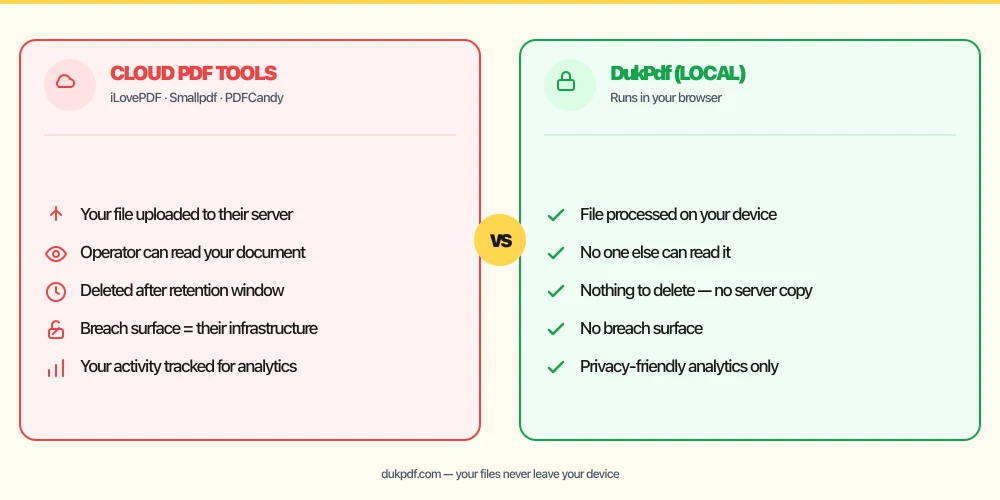
To redact a document with a cloud tool, you first have to upload it — and the version you upload is the unredacted one, the most sensitive copy that exists. For a privileged client file, a personnel record, or anything under an NDA, that upload is exactly what you are trying to avoid.
For lawyers this also intersects with professional duties. ABA Model Rule 1.6(c) requires a lawyer to make reasonable efforts to prevent unauthorized access to client information, and the duty of competence (Rule 1.1, Comment 8) expects lawyers to understand the risks of the technology they use. The simplest way to satisfy that bar is not to put the document on someone else's server in the first place.
A black box is not redaction
The most common redaction mistake is visual-only: the tool draws a black rectangle over the text but leaves the original characters in the file underneath. Anyone can select, copy, or extract that text — the “redaction” is cosmetic. This has caused real, embarrassing leaks of court filings and contracts.
DukPdf's Redact tool does the second kind: each redacted page is re-rendered as an image with the content burned out, and the original text is removed from the file — not merely covered.
How to redact a PDF locally (step by step)
- Open the Redact PDF tool. It loads in your browser — nothing is uploaded.
- Drag in your PDF (or click to choose it). The file is read on your device.
- Draw a box over each piece of text or area you want removed; add as many as you need across any page.
- Apply and download. The redacted pages are flattened to images with the original content permanently removed.
Because the whole process runs locally, you can confirm there is no file transfer in the browser's Network tab. See the private PDF editor page for how local processing works across every tool.
Related reading
HIPAA and online PDF tools
Why redacting protected health information on your device is the structurally simpler choice for healthcare workflows — no BAA, no third-party processor, no new breach surface.
FinanceIs it safe to upload bank statements to online PDF tools?
The same redaction principles apply to financial documents: account numbers, balances, and transaction history are sensitive enough that uploading the unredacted file is a risk worth avoiding.
Frequently asked questions
Is it safe to redact legal documents using an online tool?
Redacting online means uploading the unredacted document — the most sensitive version — to a third-party server. For privileged client material, the safer approach is a tool that redacts on your device so the original never leaves it.
Why is drawing a black box over text not real redaction?
If the tool only draws a black rectangle on top, the original text often still exists underneath in the file and can be copied or recovered. True redaction removes the underlying content — for example by rasterizing the page to an image and discarding the original text.
How do I redact a PDF without uploading it?
Use a browser-based tool. DukPdf's Redact PDF tool runs locally, permanently removes the content under each redaction, and never uploads your file.