
The short version
What actually happens when you upload
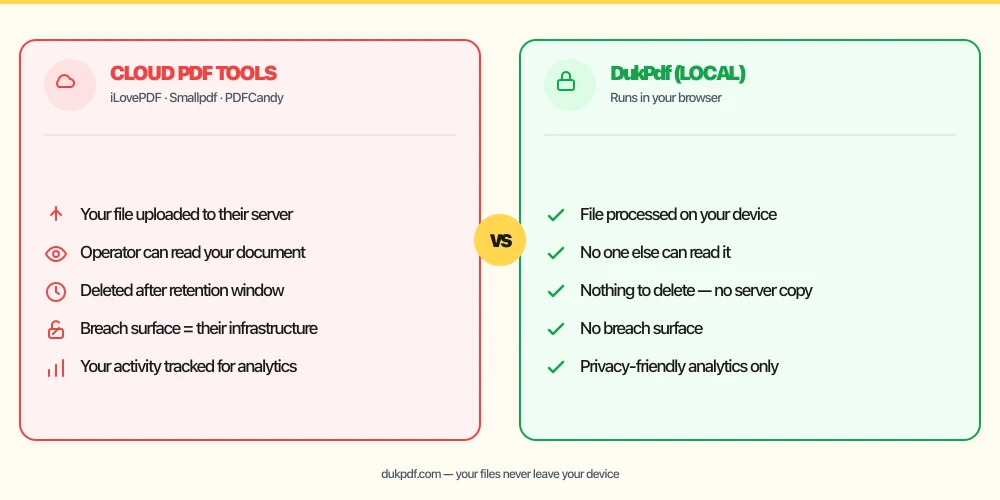
Most online PDF tools — merge, compress, convert — work by uploading your document to a server, processing it there, and sending the result back. The good ones encrypt the transfer and delete the file within an hour or two. For a holiday photo or a meeting agenda, that is perfectly reasonable.
A bank statement is different. It contains your account numbers, balances, transaction history, and often your full name and address. Once it is uploaded, a copy of that data exists on infrastructure you do not control — even if only for a couple of hours.
What can actually go wrong
Two concrete risks make this more than theoretical:
- Malicious look-alike sites. In March 2025 the FBI warned that some free online file-converter tools are used to push malware and harvest the documents people upload — including names, Social Security numbers, and banking information.
- Breaches of the service itself. PDF services are a target. In 2021 a leak exposed roughly 77 million Nitro PDF user records. Anything that sits on a server can be breached; anything that is never uploaded cannot.
To be clear: established tools like iLovePDF or Smallpdf are legitimate, document their security, and delete files on a schedule. The point is not that they are doing something wrong — it is that any upload is a copy you no longer control, and for financial documents that trade-off often is not worth it.
If you handle other people's financial data, the rules expect more
If you are a bookkeeper, accountant, tax preparer, lender, or financial adviser, this is not just about personal caution. The FTC Safeguards Rule (16 CFR §314.4) requires covered financial institutions to vet, contract with, and continuously monitor every service provider that touches customer information, and to encrypt that data in transit and at rest. Pasting a client's statement into a random online converter quietly makes that converter an unvetted service provider.
With a tool that never transmits the file, there is no service provider in the loop to vet — which is the simplest way to stay on the right side of that obligation.
The simplest fix: don't upload at all
DukPdf runs every PDF tool directly in your browser using WebAssembly. When you merge, compress, or edit a statement, the file is read and processed on your device and never sent anywhere. You can prove it: open your browser's developer tools, switch to the Network tab, and run a tool — you will see no file transfer request.
Learn more about how local processing works on the private PDF editor page.
Related reading
HIPAA and online PDF tools
The HIPAA business-associate framework is the clearest example of a privacy-by-architecture rule — and the same logic of “never upload” applies to financial documents covered by the FTC Safeguards Rule.
PrivacyHow to redact a PDF without uploading it
If you need to remove account numbers or transaction details before sharing a statement, here is how to redact a PDF locally so the original sensitive content is permanently removed, not just covered.
Frequently asked questions
Is it safe to upload a bank statement to a free online PDF tool?
For a one-off, non-sensitive file it is usually fine. For a bank statement it is a judgment call: even reputable tools that delete files after a couple of hours still hold your financial data on a third-party server during processing. The safest option is a tool that never uploads the file at all.
Do online PDF tools keep my files?
Reputable services delete uploads after a short retention window (often an hour or two). But "deleted later" is not the same as "never uploaded" — during processing the document is on their infrastructure, and breaches or malicious look-alike sites can still expose it.
How can I edit a bank statement without uploading it?
Use a tool that runs in your browser. DukPdf processes PDFs locally with WebAssembly, so the file never leaves your device — you can confirm it in the browser Network tab.